> ## Documentation Index
> Fetch the complete documentation index at: https://docs.smew.ai/llms.txt
> Use this file to discover all available pages before exploring further.
# Claude Code 快速开始指南
## SmewAI Claude Code 快速开始指南
## 前置条件:安装 Node.js 环境
Codex 依赖 Node.js 运行环境,请先参考 [Node.js 环境安装指南](nodejs-setup) 完成安装并验证。
## 更省事的方式:自动配置
如果你不想手动安装和逐项写配置,推荐直接使用 [自动配置工具](auto-config-tool)。
## 1. 安装 Codex
```bash theme={null} theme={null}
npm install -g @openai/codex@latest
```
macOS / Linux 遇到权限问题时加 `sudo`:
```bash theme={null} theme={null}
sudo npm install -g @openai/codex@latest
```
验证安装:
```bash theme={null} theme={null}
codex --version
```
## 2. 创建 API Key
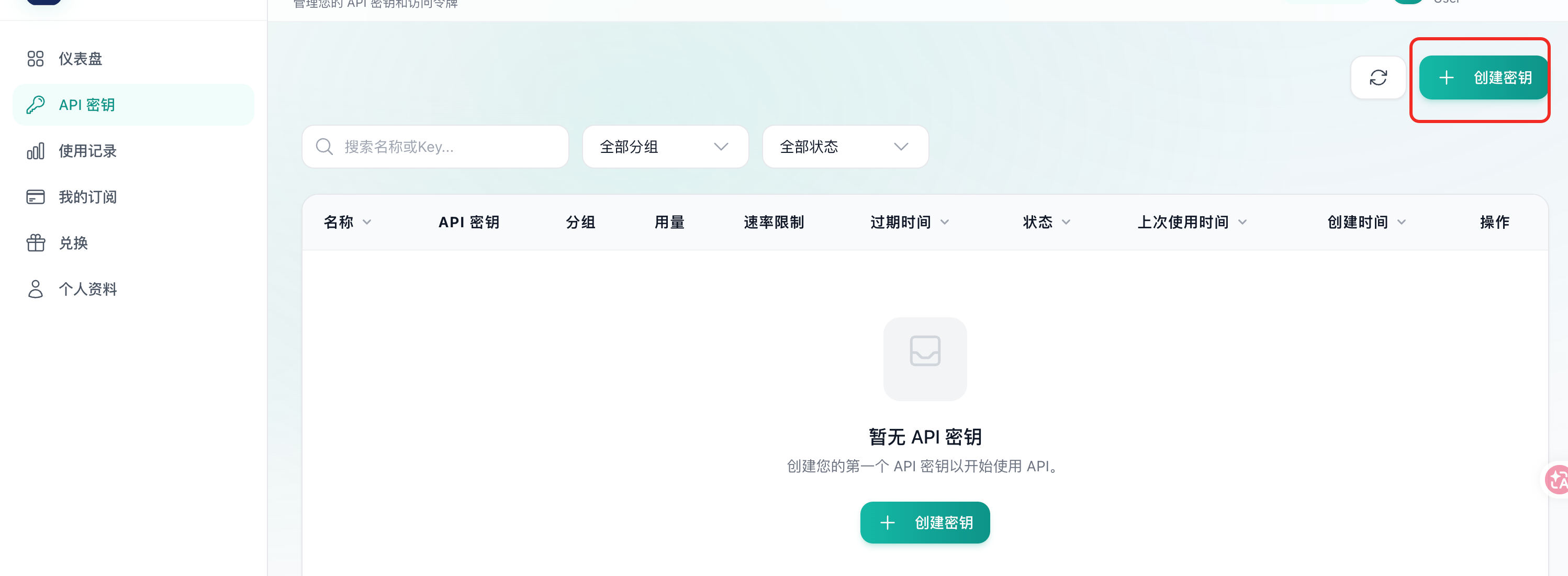
登录 [SmewAI 控制台](https://smew.ai/keys),进入 **API 密钥** 页面,点击 **创建密钥**。
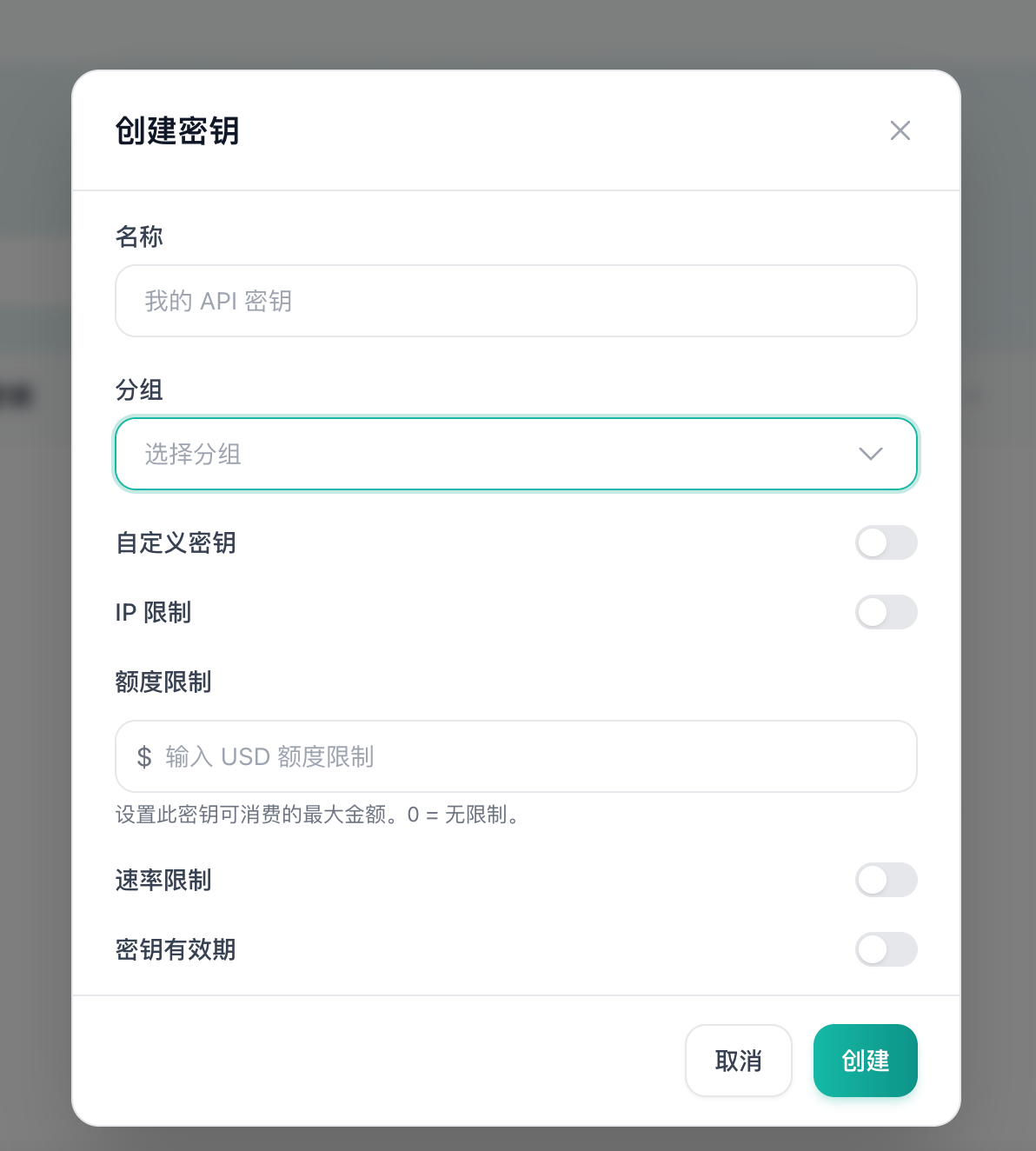 填写密钥名称,选择 GPT / Codex 对应分组,按需配置 IP 限制、额度限制、速率限制和有效期。新手建议直接使用默认配置。
> **安全提示**:API Key 等同于账号凭证,请妥善保管,切勿提交到代码仓库或公开分享。
## 3. 导入密钥到 Codex
推荐使用 **SmewAI Launcher** 工具进行一键配置,也可手动创建配置文件。
### 方式一:SmewAI Launcher(推荐)
下载安装配置工具后,点击 **导入到启动器** 完成一键导入。导入后点击 **启用** 即可。
### 方式二:手动配置文件
在 `~/.codex/`(Windows 为 `%USERPROFILE%\\.codex\\`)目录下创建 `config.toml`:
```toml theme={null} theme={null}
model_provider = "smewai"
model = "gpt-5.4"
model_reasoning_effort = "high"
disable_response_storage = true
preferred_auth_method = "apikey"
[model_providers.smewai]
name = "smewai"
base_url = "https://smew.ai"
wire_api = "responses"
requires_openai_auth = true
```
再创建 `auth.json`:
```json theme={null} theme={null}
{
"OPENAI_API_KEY": "YOUR_API_KEY"
}
```
## 4. 开始使用
进入任意项目目录,运行:
```bash theme={null} theme={null}
codex
```
Codex 会自动分析当前目录的代码并提供智能编程辅助。更多用法请参考 [OpenAI 官方文档](https://github.com/openai/codex)。
## 常见问题(FAQ)
**Q:运行 `npm install -g` 提示权限不足?**\
A:macOS / Linux 在命令前加 `sudo`;Windows 使用管理员权限运行 PowerShell。
**Q:`codex --version` 提示命令不存在?**\
A:确认 npm 全局目录已加入系统 `PATH`,可运行 `npm bin -g` 查看路径并手动添加。
**Q:连接失败或返回 401 错误?**\
A:检查 `config.toml` 中 `base_url` 是否为 `https://smew.ai`,以及 `auth.json` 中的 API Key 是否填写正确且未过期。
填写密钥名称,选择 GPT / Codex 对应分组,按需配置 IP 限制、额度限制、速率限制和有效期。新手建议直接使用默认配置。
> **安全提示**:API Key 等同于账号凭证,请妥善保管,切勿提交到代码仓库或公开分享。
## 3. 导入密钥到 Codex
推荐使用 **SmewAI Launcher** 工具进行一键配置,也可手动创建配置文件。
### 方式一:SmewAI Launcher(推荐)
下载安装配置工具后,点击 **导入到启动器** 完成一键导入。导入后点击 **启用** 即可。
### 方式二:手动配置文件
在 `~/.codex/`(Windows 为 `%USERPROFILE%\\.codex\\`)目录下创建 `config.toml`:
```toml theme={null} theme={null}
model_provider = "smewai"
model = "gpt-5.4"
model_reasoning_effort = "high"
disable_response_storage = true
preferred_auth_method = "apikey"
[model_providers.smewai]
name = "smewai"
base_url = "https://smew.ai"
wire_api = "responses"
requires_openai_auth = true
```
再创建 `auth.json`:
```json theme={null} theme={null}
{
"OPENAI_API_KEY": "YOUR_API_KEY"
}
```
## 4. 开始使用
进入任意项目目录,运行:
```bash theme={null} theme={null}
codex
```
Codex 会自动分析当前目录的代码并提供智能编程辅助。更多用法请参考 [OpenAI 官方文档](https://github.com/openai/codex)。
## 常见问题(FAQ)
**Q:运行 `npm install -g` 提示权限不足?**\
A:macOS / Linux 在命令前加 `sudo`;Windows 使用管理员权限运行 PowerShell。
**Q:`codex --version` 提示命令不存在?**\
A:确认 npm 全局目录已加入系统 `PATH`,可运行 `npm bin -g` 查看路径并手动添加。
**Q:连接失败或返回 401 错误?**\
A:检查 `config.toml` 中 `base_url` 是否为 `https://smew.ai`,以及 `auth.json` 中的 API Key 是否填写正确且未过期。