> ## Documentation Index
> Fetch the complete documentation index at: https://docs.smew.ai/llms.txt
> Use this file to discover all available pages before exploring further.
# 自动配置工具
## SmewAI 自动配置工具
这篇文档解决一件事:用一条命令把 `Codex` 安装并接到 `SmewAI`,即使你的机器还没有 Node.js,也可以继续走下去。
***
## 1. 创建 API Key
脚本执行过程中会提示你输入 API Key,因此先在 SmewAI 控制台创建好备用。
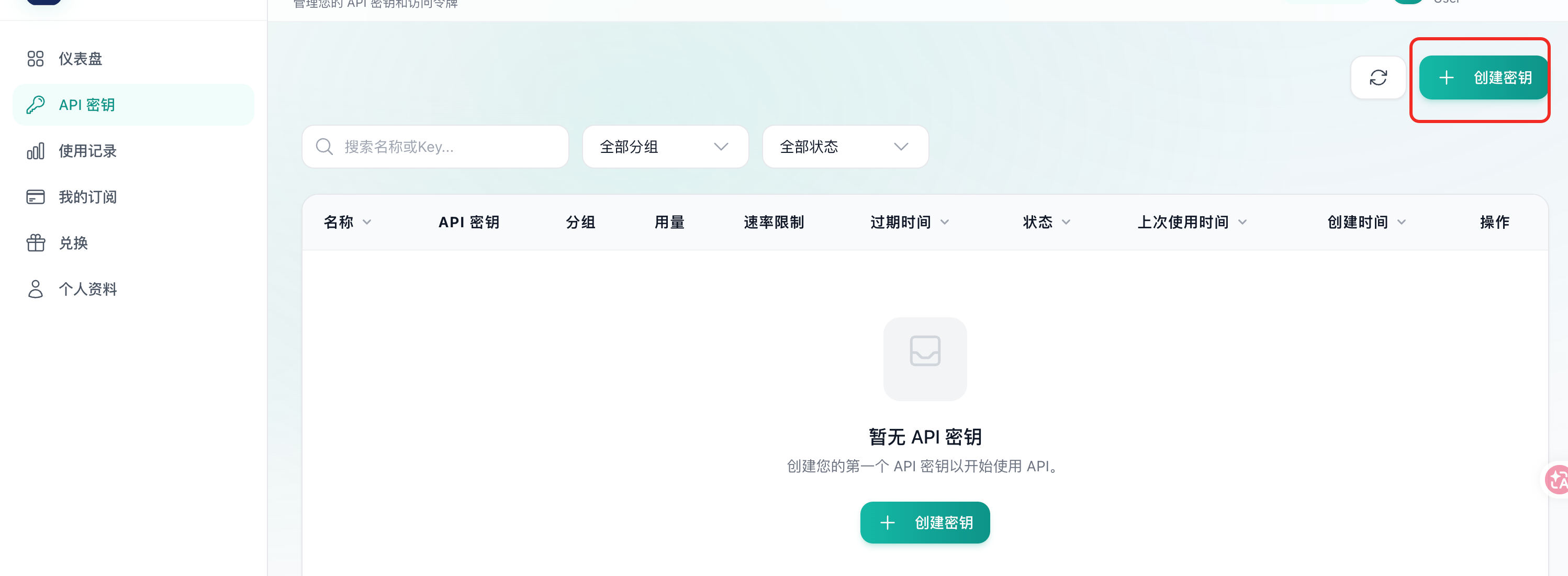
登录 [SmewAI 控制台](https://smew.ai/keys),进入 **API 密钥** 页面,点击 **创建密钥**。
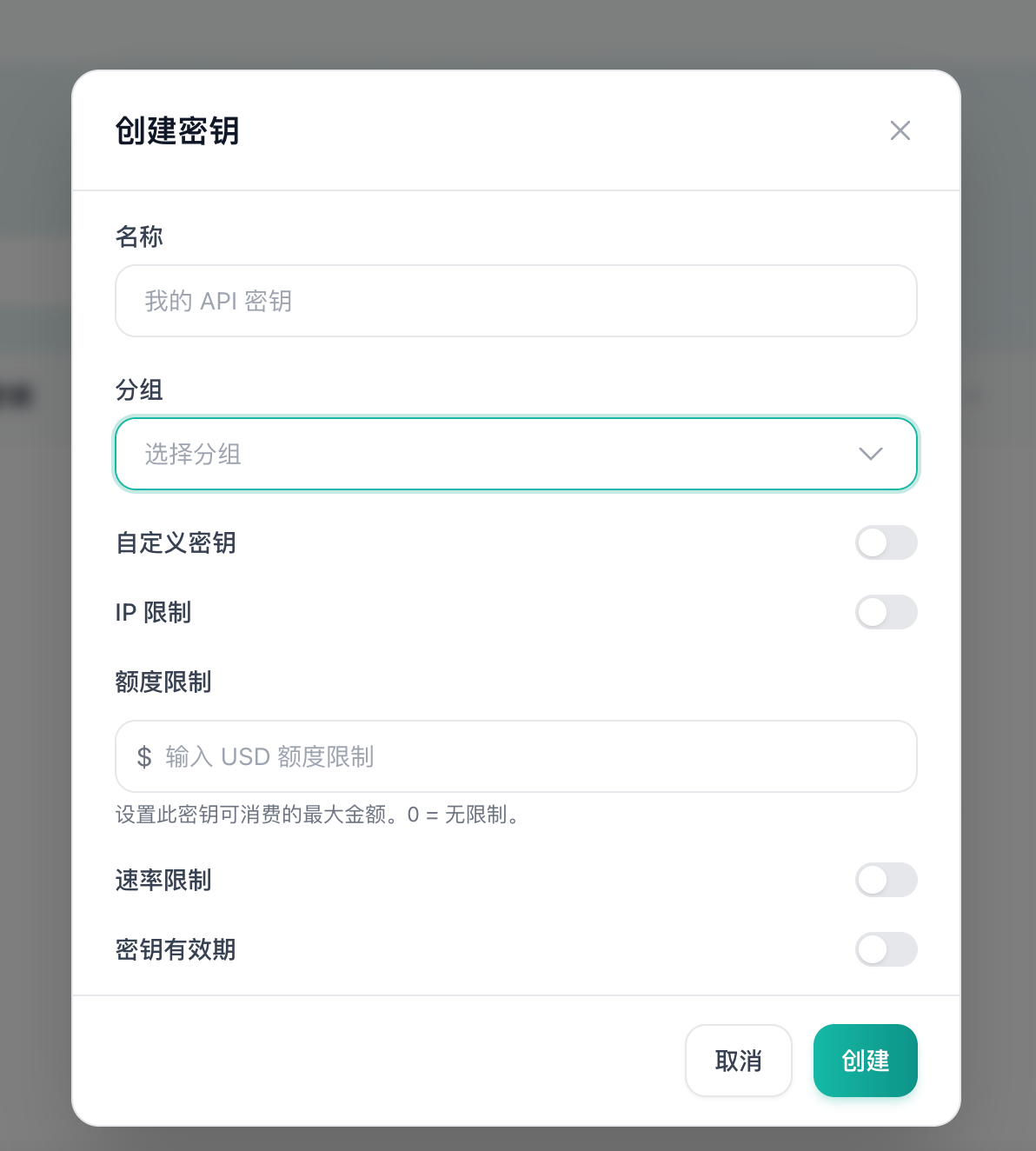 填写密钥名称,并选择 GPT / Codex 对应分组。创建完成后,在列表中点击密钥旁的 **复制** 按钮拿到完整的 API Key,稍后在脚本交互中粘贴。
> **安全提示**:API Key 等同于账号凭证,请妥善保管,切勿提交到代码仓库或公开分享。
## 2. 推荐用法
### macOS / Linux
直接执行:
```bash theme={null} theme={null}
curl -fsSL https://smew.ai/auto-config/install.sh | bash
```
脚本会自动完成以下动作:
* 检测当前系统是否已有可用的 Node.js
* 如果没有,则在当前用户目录下安装本地 Node.js 运行时
* 将 npm 镜像切到国内源,降低无代理环境下载失败率
* 安装 `Codex`
* 写入对应配置文件
* 最后执行版本检查,确认命令可以运行
### Windows PowerShell
直接执行:
```powershell theme={null} theme={null}
irm https://smew.ai/auto-config/install.ps1 | iex
```
## 3. 常用参数
### 只配置 Codex
macOS / Linux:
```bash theme={null} theme={null}
curl -fsSL https://smew.ai/auto-config/install.sh | bash -s -- --codex-api-key YOUR_CODEX_KEY --tools codex
```
Windows PowerShell(管道模式):
```powershell theme={null} theme={null}
$env:SMEWAI_CODEX_API_KEY='YOUR_CODEX_KEY'; $env:SMEWAI_TOOLS='codex'; irm https://smew.ai/auto-config/install.ps1 | iex
```
### 自定义 API 地址
如果你部署了自定义域名,可以覆盖默认地址:
```bash theme={null} theme={null}
curl -fsSL https://smew.ai/auto-config/install.sh | bash -s -- --codex-api-key YOUR_CODEX_KEY --base-url https://your-domain.example.com
```
## 4. 脚本会写哪些文件
脚本会写入:
```text theme={null} theme={null}
~/.codex/auth.json
~/.codex/config.toml
```
`auth.json`:
```json theme={null} theme={null}
{
"OPENAI_API_KEY": "YOUR_API_KEY"
}
```
`config.toml`:
```toml theme={null} theme={null}
model_provider = "OpenAI"
model = "gpt-5.4"
review_model = "gpt-5.4"
model_reasoning_effort = "high"
disable_response_storage = true
network_access = "enabled"
[model_providers.OpenAI]
name = "OpenAI"
base_url = "https://smew.ai"
wire_api = "responses"
requires_openai_auth = true
```
## 5. 不需要管理员权限吗
默认不需要。脚本优先使用系统已有的 Node.js;如果没有,就把 Node.js 安装到当前用户目录:
* macOS / Linux:`~/.smewai/node`
* Windows:`%USERPROFILE%\.smewai\node`
## 6. 如何确认已经成功
```bash theme={null} theme={null}
codex --version
```
只要命令能输出版本号,通常就说明安装链路已经打通。
填写密钥名称,并选择 GPT / Codex 对应分组。创建完成后,在列表中点击密钥旁的 **复制** 按钮拿到完整的 API Key,稍后在脚本交互中粘贴。
> **安全提示**:API Key 等同于账号凭证,请妥善保管,切勿提交到代码仓库或公开分享。
## 2. 推荐用法
### macOS / Linux
直接执行:
```bash theme={null} theme={null}
curl -fsSL https://smew.ai/auto-config/install.sh | bash
```
脚本会自动完成以下动作:
* 检测当前系统是否已有可用的 Node.js
* 如果没有,则在当前用户目录下安装本地 Node.js 运行时
* 将 npm 镜像切到国内源,降低无代理环境下载失败率
* 安装 `Codex`
* 写入对应配置文件
* 最后执行版本检查,确认命令可以运行
### Windows PowerShell
直接执行:
```powershell theme={null} theme={null}
irm https://smew.ai/auto-config/install.ps1 | iex
```
## 3. 常用参数
### 只配置 Codex
macOS / Linux:
```bash theme={null} theme={null}
curl -fsSL https://smew.ai/auto-config/install.sh | bash -s -- --codex-api-key YOUR_CODEX_KEY --tools codex
```
Windows PowerShell(管道模式):
```powershell theme={null} theme={null}
$env:SMEWAI_CODEX_API_KEY='YOUR_CODEX_KEY'; $env:SMEWAI_TOOLS='codex'; irm https://smew.ai/auto-config/install.ps1 | iex
```
### 自定义 API 地址
如果你部署了自定义域名,可以覆盖默认地址:
```bash theme={null} theme={null}
curl -fsSL https://smew.ai/auto-config/install.sh | bash -s -- --codex-api-key YOUR_CODEX_KEY --base-url https://your-domain.example.com
```
## 4. 脚本会写哪些文件
脚本会写入:
```text theme={null} theme={null}
~/.codex/auth.json
~/.codex/config.toml
```
`auth.json`:
```json theme={null} theme={null}
{
"OPENAI_API_KEY": "YOUR_API_KEY"
}
```
`config.toml`:
```toml theme={null} theme={null}
model_provider = "OpenAI"
model = "gpt-5.4"
review_model = "gpt-5.4"
model_reasoning_effort = "high"
disable_response_storage = true
network_access = "enabled"
[model_providers.OpenAI]
name = "OpenAI"
base_url = "https://smew.ai"
wire_api = "responses"
requires_openai_auth = true
```
## 5. 不需要管理员权限吗
默认不需要。脚本优先使用系统已有的 Node.js;如果没有,就把 Node.js 安装到当前用户目录:
* macOS / Linux:`~/.smewai/node`
* Windows:`%USERPROFILE%\.smewai\node`
## 6. 如何确认已经成功
```bash theme={null} theme={null}
codex --version
```
只要命令能输出版本号,通常就说明安装链路已经打通。